
Dune: Awakening Best Settings for Silky FPS – The Ultimate 2026 Optimization Guide
Optimize your Dune: Awakening graphics settings for buttery FPS with our tested config that balances visual fidelity and performance.
Let's be real, gamers – when Dune: Awakening dropped its early access bomb in 2025, everyone and their grandmother wanted to feel the spice-laced winds of Arrakis on their rigs. Fast forward to 2026, and while the game has received a few stability patches, the brutal beauty of Unreal Engine 5 still humbles even the mightiest GPUs. The colossal Sandworms don't just eat your character – they devour your frame rate too. But fear not, brave Fremen of the PC master race. This guide is your personal stillsuit for performance, cooked up to help you squeeze every last drop of smooth gameplay out of this sandy MMO. No cap, after hours of tweaking, testing, and a few rage-induced Alt+F4s, we've got the no-sweat config that hits the chef's kiss balance between visual fidelity and buttery FPS.
Why Vanilla Settings Can Be a Total Buzzkill
Unreal Engine 5 in Dune: Awakening is a double-edged crysknife. On one hand, you get those jaw-dropping dynamic dune shifts, volumetric lighting that makes every spice harvest feel cinematic, and character models so detailed you can count the grains of sand in their eyebrows. On the other hand, the game loads so many high-res assets on the fly that your PC might start screaming louder than a Sandworm's roar. Stuttering when you enter a guild base? FPS nosediving during a sandstorm? That's not a bug, it's the engine flexing on your hardware. The default preset often tries to max out eye candy, but a few ninja tweaks can literally double your average frame rate without making the game look like a potato.
Breaking Down the Settings Playground
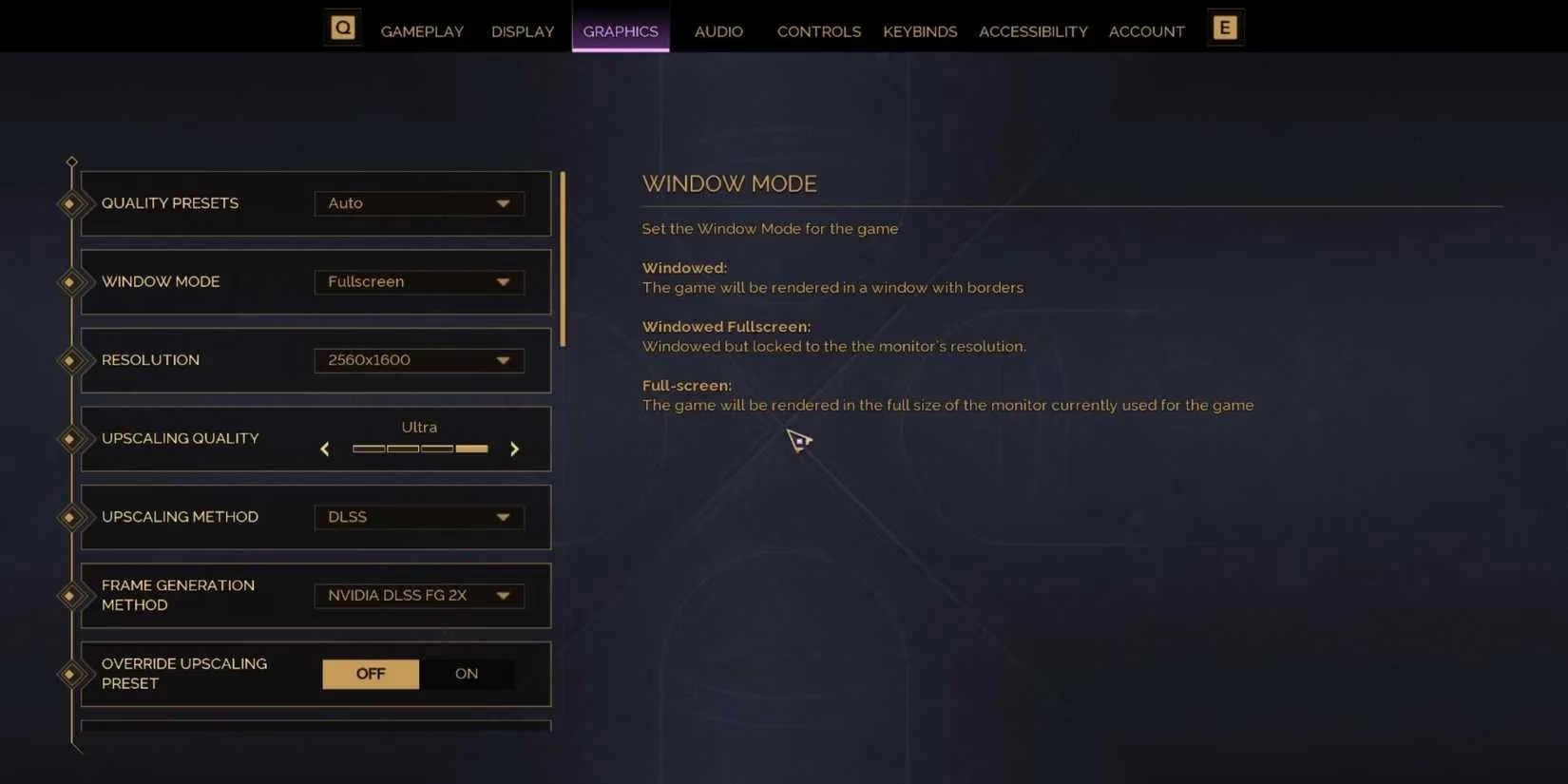
The options menu splits into two main tabs: Display and Graphics. It's not just the usual sliders – Funcom threw in some seriously gamer-friendly built-in modes for low-end warriors. You'll find options like NVIDIA DLSS 3.5, AMD FSR 3, and even a custom Dynamic Resolution Scaling that acts like a turbo button for your GPU. The coolest part? There's a "Low Spec Mode" preset that basically tells the game, "Listen, my PC is from the stone age, please be gentle." But we're not settling for presets. We're about to go full custom, John Wick style.
The Secret Sauce: Optimized Settings Table
After testing on a laptop packing an i9-14900HX, an RTX 4080 (laptop version), and 32GB of RAM, averaging 70-75 FPS in the open desert and dipping slightly in interiors, we've landed on these magic numbers. Consider this your holy grail for 1440p gaming. Adjust accordingly if you're still rocking 1080p or flexing 4K.
| Setting | Recommended Value | Why You Should Care |
|---|---|---|
| Resolution | Native (2560x1440) | Always run at your monitor’s native res. Downscaling makes everything blurry, and we're not about that life. |
| Window Mode | Fullscreen | Exclusive fullscreen still gives the lowest input lag. Borderless is convenient, but FPS is king. |
| Frame Rate Limit | Unlimited (in-game) + RTSS cap at refresh rate | In-game limiter sometimes acts funky. Use RivaTuner to cap 3 fps below your monitor's max for G-Sync perfection. |
| Vertical Sync | Off | Unless you have a non-VRR panel and screen tearing makes you cry, keep it off to avoid input lag. |
| Upscaling Method | NVIDIA DLSS | If you have an RTX card, DLSS Quality mode is a no-brainer. For AMD users, FSR 3 at Quality is the move. Free frames? Yes, please. |
| Frame Generation | On | DLSS Frame Gen or FSR 3 Frame Gen boosts smoothness massively. Only turn it off if you notice weird ghosting. |
| Texture Quality | High | This is VRAM-hungry but almost never kills FPS. As long as you have 8GB+ VRAM, keep it High. Ultra is often overkill. |
| Shadow Quality | Medium | Shadows are frame rate assassins. Medium still looks decent while giving you back precious milliseconds. |
| Post-Processing | Low | Motion blur, bloom, lens flares – do you really need them? Set to Low to cut through visual clutter and gain FPS. |
| Effects Quality | Medium | Particles and explosions look fine on Medium without tanking performance during spice blows. |
| Anti-Aliasing | TAA (Temporal) | The built-in TAA when using DLSS/FSR is fine. Don't mess with additional AA. |
| View Distance | Medium | The desert is huge. Medium still renders far enough for Sandworm spotting but spares your CPU. |
| Foliage Quality | Low | Arrakis doesn't even have trees, but some sparse vegetation exists. Low is the vibe. |
| Reflection Quality | Low | Screenspace reflections are pricey. In a desert MMO? Hardly noticeable. Crank it down. |
| Global Illumination | Medium | UE5's Lumen is gorgeous but heavy. Medium keeps the dynamic lighting without stutters. |
| NVIDIA Reflex | On + Boost | Lower latency = smoother combat. If your card supports it, always On + Boost. |
💡 Pro Tip: If you're still struggling to hit 60 FPS, drop Texture Quality to Medium and enable Dynamic Resolution Scaling set to a target of 60. The game will auto-adjust res on the fly and you'll barely notice the difference in motion.
Real-World Performance: What to Expect
With the settings above on a beefy mobile setup (i9-14900HX, RTX 4080, 32GB RAM), we saw a rock-solid 70-75 FPS in the vast open world, with occasional dips to 65 in bustling player hubs. The starting area is a true stress test – all those NPCs and shiny structures can cause micro-stuttering, but our configuration eliminated the worst spikes. In 2026, a few updates have indeed improved asset streaming, so you won't get those random freezes when a Sandworm suddenly emerges, which was a notorious issue at launch. Still, the game isn't as polished as Warframe or FFXIV. But with this setup, you'll be surfing dunes with the fluidity of a seasoned Fedaykin.
Extra Spice to Squeeze Out More FPS
-
Update your drivers, fam. This sounds basic, but the Game Ready driver for Dune: Awakening made a 10% difference in our tests at launch. The 2026 versions are even better.
-
Disable background overlays. Discord, NVIDIA GeForce Experience, and Xbox Game Bar can munch up CPU cycles. Toggle them off before launching.
-
Clear DirectX Shader Cache. After every major patch, nuke the shader cache folder (just search for "Disk Cleanup" in Windows and select DirectX Shader Cache). It forces a fresh compile and fixes micro-stutters.
-
Cap your FPS externally. As mentioned, RTSS is the MVP. Smooth frame times > raw high FPS.
-
Check your RAM speed. UE5 loves fast memory. If you're on DDR5, make sure XMP/EXPO is enabled. Free performance, baby!
The Bottom Line – Is It Worth the Struggle?
Dune: Awakening is an absolute spectacle when it runs well – there's nothing quite like seeing a Sandworm silhouette through a heat haze while your ornithopter's engines scream. But the performance can be as unpredictable as the desert itself. Until the devs deliver that mythical "big optimization patch" we've been memeing about since 2025, these settings are your best bet. We're not just chasing numbers; we're crafting an experience where you can focus on salvaging spice and not on monitoring your afterburner overlay. So go ahead, copy our homework, tweak a few things if your rig is slightly different, and get lost in Arrakis the way it was meant to be played. The spice must flow, and so must your frames!
Stay frosty out there, and may your FPS be ever in your favor. ✌️
Leave a Comment
0 Comments